
How do I pair my Impulse Pack for the first time?Updated 5 months ago
- Make sure your Katalyst App is up to date in the App Store
- Make sure your iPad/iPhone iOS is up to date in the device settings
- Make sure your Bluetooth is on and allowed to access the Katalyst App. You can check this by opening your iPad/iPhone settings > scroll to Apps at the bottom > choose Katalyst > make sure you allow Katalyst to connect to Bluetooth device
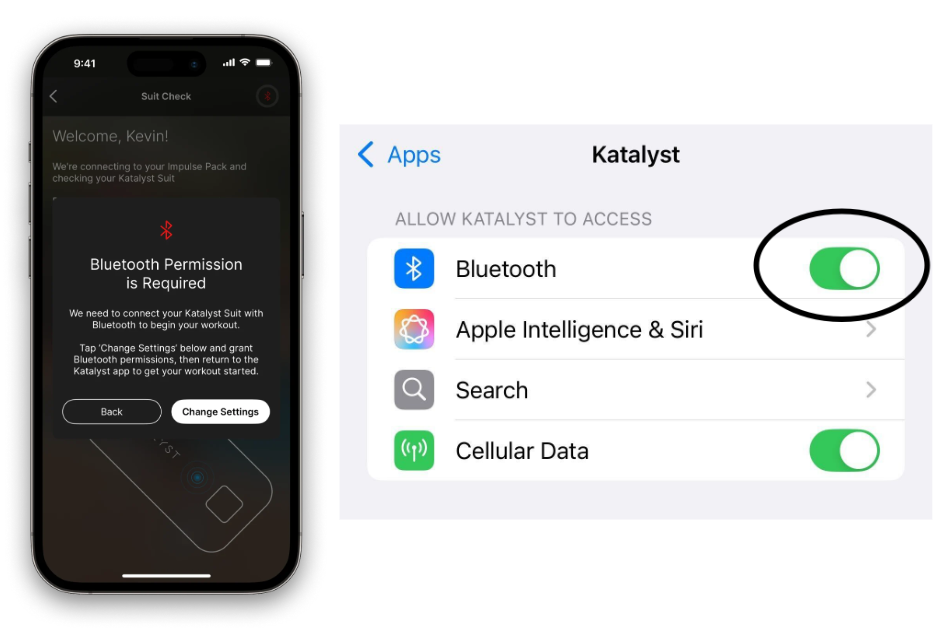
- Time to pair your impulse pack! Open your Katalyst app. If you are not within the Katalyst app, pairing will not be successful, as pairing happens here and not within device settings.
- Press and hold the Impulse Pack power button for several seconds until the flashing blue light changes to a rapid flashing blue light. Once the impulse pack is rapidly flashing blue, release your finger from the button. You will see a pop-up notification with a request to pair > choose Pair. To see this process of the blue flashing light, watch this short video:
.gif)